Free Chrome Extension
NameStation for Chrome
Turn any highlighted text, idea, or keyword into available domain names - without leaving the page you're on.
Free to install. Works with your existing NameStation account.
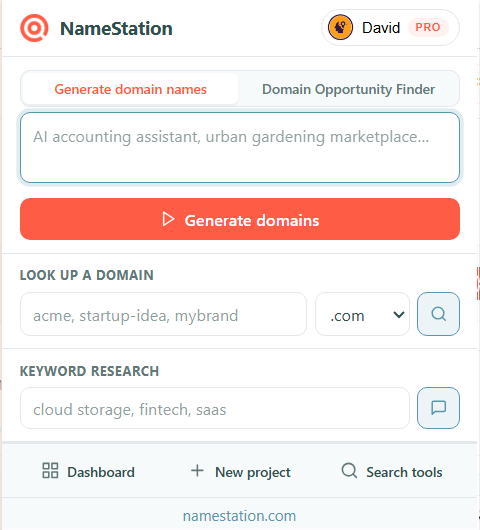
Generate domain names instantly
Type any idea into the popup and jump straight into NameStation's AI generator - no new tab, no copy-paste.
Right-click any selection
Highlight text on any page and right-click: "Find available domains" opens NameStation with your selection pre-filled, or "Explore related concepts" fans it out into related topic angles with the Opportunity Scanner.
Look up any domain in seconds
The popup auto-fills with the current tab's domain so a quick availability check is one click away.
Keyword research from any tab
Enter any keyword and jump straight to NameStation's Keyword Research tool without interrupting your workflow.
Context-aware
Works on every site you visit
The extension's right-click menu and smart prefill work on any page - not just NameStation. Wherever you read about a trend, competitor, or idea, your domain tools are one right-click away.
GmailLinkedInX / TwitterRedditProduct HuntHacker NewsGoogle TrendsNotionMediumGoogle DocsSlackAny website
Features
Everything in one popup
All of NameStation's core search tools, condensed into a lightweight popup that opens in under a second.
Setup
Up and running in 30 seconds
No account required to install. Sign in for AI generation and saving names to your project.
1
Install the extension
Click "Add to Chrome" and accept the permissions. The NameStation icon appears in your toolbar in seconds.
2
Pin it to your toolbar
Click the puzzle-piece Extensions menu and pin NameStation so the icon is always one click away.
3
Highlight, right-click, or type
Select any text on any page and right-click to find available domains, or open the popup to generate names, look up a domain, or research a keyword.
Your data stays private. Recent searches are stored only in your browser and never leave your device. The only network call the extension makes is to NameStation to check whether you're signed in. Privacy policy
Find domain names wherever you work
Install the free Chrome extension and turn any tab into a domain name research session - with the full power of NameStation's AI tools in a single click.